TaxTriage Documentation




See it first
Interactive report demo Example ODR (PDF) Pathogen sheet
The demo is a live report built from the example dataset, its the same artifact the pipeline writes at the end of a run, complete with live filters and sample QC flags you can edit in the browser. The ODR is the static PDF deliverable. The pathogen sheet is every organism TaxTriage can flag, searchable and filterable.
About TaxTriage
TaxTriage is a flexible, containerized bioinformatics pipeline designed to identify pathogens within complex samples (e.g., respiratory swabs, lesion swabs, whole blood) using untargeted DNA or RNA sequencing data. It supports short-read (Illumina) and long-read (ONT, PacBio) platforms, incorporating quality control, organism classification, read mapping, and a unified confidence metric for all identified organisms.
The final analysis output is an Organism Discovery Report (ODR) - 2 files (a PDF and an interactive HTML) with summaries of all intermediate data supporting pathogen identification. TaxTriage is designed for broad deployment and early-stage outbreak investigations and is not intended as a standalone diagnostic capability.
Quick Navigation
| Section | Description |
|---|---|
| Installation | Install Nextflow, Docker, and Singularity |
| Quick Start | Run your first test pipeline in minutes |
| Samplesheet | Format and prepare your input samplesheet |
| Running the Pipeline | Commands, profiles, and execution modes |
| CLI Parameters | Full reference for all pipeline parameters |
| Pipeline Modules | Step-by-step breakdown of the workflow |
| Output | Understanding output files and directories |
| TASS Scoring | How the confidence score is calculated |
| Microbial Categories | Primary, Opportunistic, Potential, Commensal - what they mean and how to read them |
| In-Silico Simulation | Simulated read validation |
| Cloud & Seqera | Running on AWS with Nextflow Tower / Seqera |
| Geneious Plugin | Geneious Prime integration |
| Troubleshooting | FAQ and common errors |
| Contributing | How to contribute to TaxTriage |
| Citations | Tools and publications to cite |
Pipeline Overview
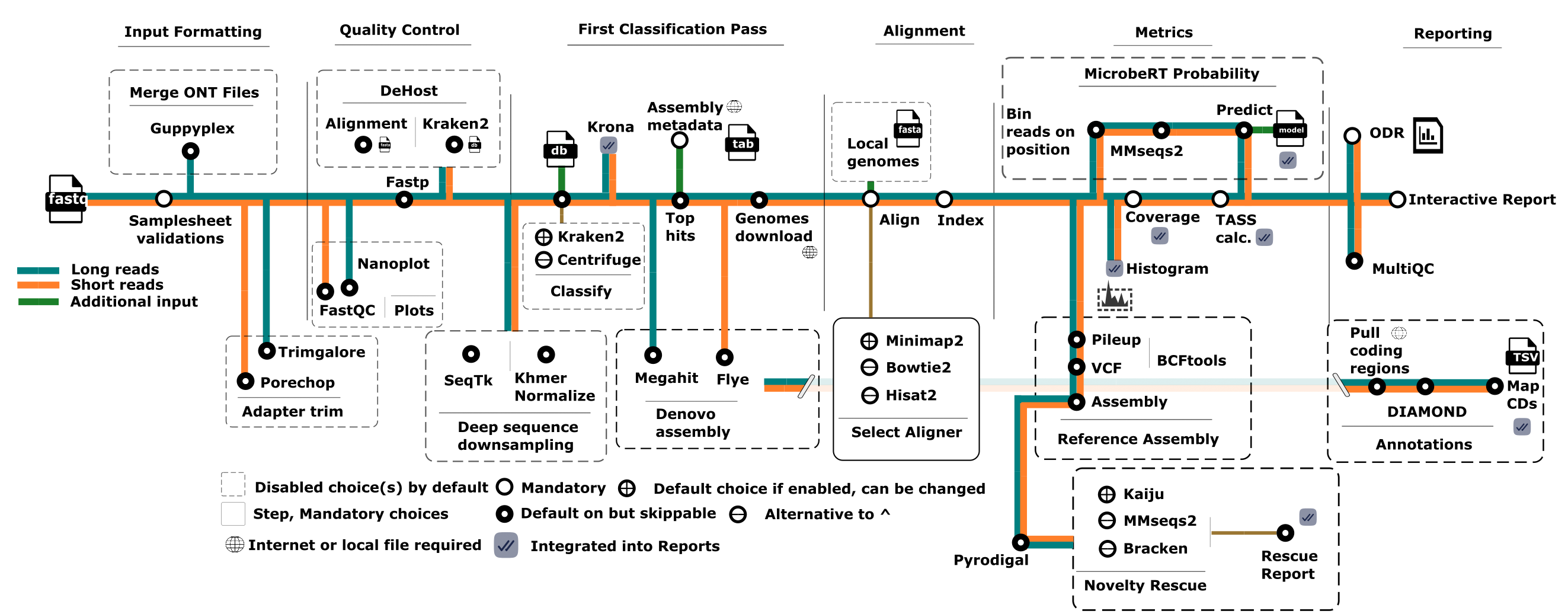
TaxTriage ingests raw FASTQ data and processes it through the following major stages:
- Read QC - FastQC / NanoPlot / pycoQC
- Trimming - Trimgalore (Illumina) / Porechop (ONT); optional fastp / fastplong quality filtering with
--enable_fastp(off by default) - Host Removal - Minimap2 against host reference
- Metagenomics Classification - Kraken2 (+ Krona plots)
- Top Hits Assignment - Selects organisms for alignment
- Reference Preparation - Downloads assemblies from NCBI
- Alignment - BWA-MEM2 (Illumina) / Minimap2 (ONT/PacBio)
- Stats - Coverage, depth, MAPQ via samtools
- TASS Scoring - Confidence metric calculation
- Report Generation - MultiQC + Organism Discovery Report PDF
Collaborative Efforts
UW Madison - Geneious Prime Plugin
Dave O'Connor's Laboratory at the University of Wisconsin-Madison developed a custom Geneious Prime plugin to run TaxTriage analyses directly from within Geneious. See the Geneious Plugin page for details.
Citation
If you use TaxTriage, please cite:
Brian B. Merritt & Jeremy D. Ratcliff et. al, TaxTriage: an open-source metagenomic sequencing data analysis pipeline enabling putative pathogen detection. doi: 10.1093/bioinformatics/btag119/8571885
See the Citations page for the full list of tools to cite.
Copyright
Copyright 2022 - 2026 The Johns Hopkins University Applied Physics Laboratory LLC. See LICENSE for details.